Cookie & GDPR Manager is a smooth and user-friendly solution for managing your privacy policy, cookie policy, terms and conditions, and cookie banner – helping you comply with regulations such as GDPR.
In this guide, we’ll walk you through how to order the service and manage it in the control panel.
Order Cookie & GDPR Manager
- Order the service via https://websupport.se/en/cookie-gdpr-manager/ by clicking Get started with Cookie & GDPR Manager. Choose the license that best fits your needs – we offer several tiers based on factors such as traffic and functionality. For most users, the basic plan is a great place to start, and you can always upgrade later if needed.
- Next, enter the domain you want to connect to the service.
- Log in to your Websupport account (if you’re not already logged in) and complete your order at checkout.
- Once your order is completed, Cookie & GDPR Manager will be available in your Websupport control panel under the Services section.


Click on the service to open the Cookie & GDPR Manager control panel.
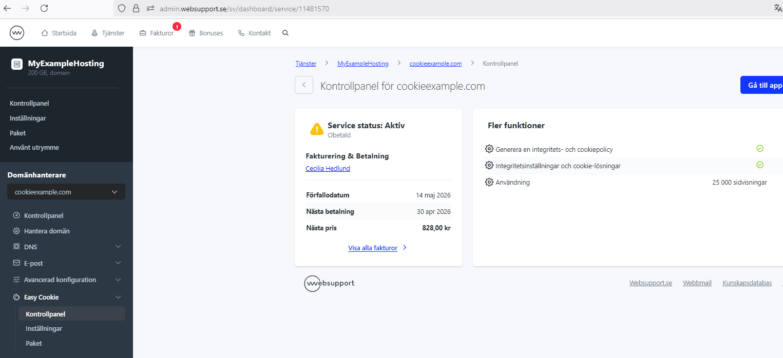
From here, you can:
- Upgrade or change your license if needed
- View the service status and expiration date
- Access the service via the Go to app button
- Manage billing or cancel the service

