
502 Bad Gateway
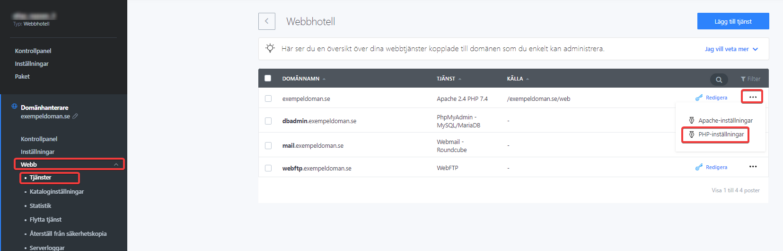
This error message usually occurs if your website uses an older version of PHP. Fix it by making sure you have the correct PHP version in your control panel where you can also change it. Log in and navigate to Web > Services > Options > PHP Settings. Note that if you run a CMS, a PHP update can affect the functionality of your various plugins/extensions.
In some situations, the error occurs in your CMS when Xcache is used. We recommend that you disable Xcache by adding the following lines to your website’s .htaccess file.
php_flag xcache.cacher Off
php_flag xcache.size 0
php_flag xcache.stat Off
php_value opcache.enable 0
504 Gateway Timeout
If you encounter this, an error has most likely occurred in our infrastructure that we’re already aware of and working to fix.
We monitor constantly and act as soon as we see an increase in these error codes. From a technical perspective, this is a problem in communication between our storage environment and the web server in question.

