
This guide shows how to implement cookie blocking using Cookie & GDPR Manager together with Google Tag Manager (GTM), with prior blocking enabled.
This means that non-essential cookies are blocked until the visitor has given their consent – a requirement under GDPR.
Note: Before you begin, make sure you have configured the Cookie & GDPR Manager (iubenda) tags in Google Tag Manager. We have a simple guide for this available here.
If your website is built with WordPress, there is an official plugin you can use to add Cookie & GDPR Manager to your site. You can find our guide for that here.
What is Prior Blocking?
The General Data Protection Regulation (GDPR) requires websites to obtain informed consent from users before using cookies that are not strictly necessary for the website’s basic functionality.
Prior blocking ensures that users have control over their personal data by allowing them to decide whether non-essential cookies should be placed on their device.
Find your code in Cookie & GDPR Manager (iubenda)
- Log in to the Websupport control panel
- Go to Services → Cookie & GDPR Manager
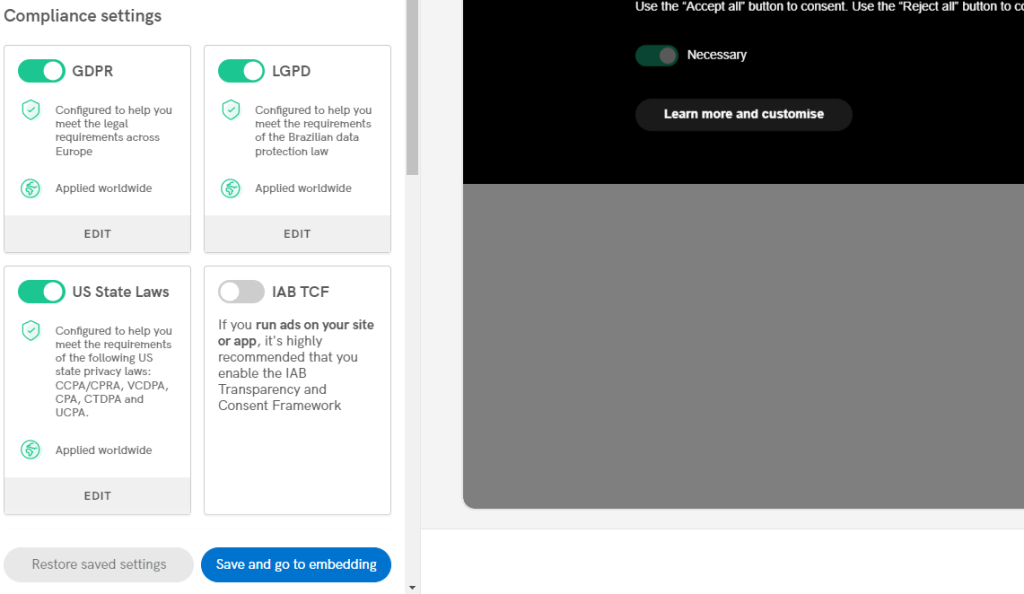
- Click Go to app In the Cookie & GDPR Manager (iubenda) dashboard, locate Privacy Controls and Cookie Solution and click Configure
- Make sure all your policies are in place and click Save and go to embedding
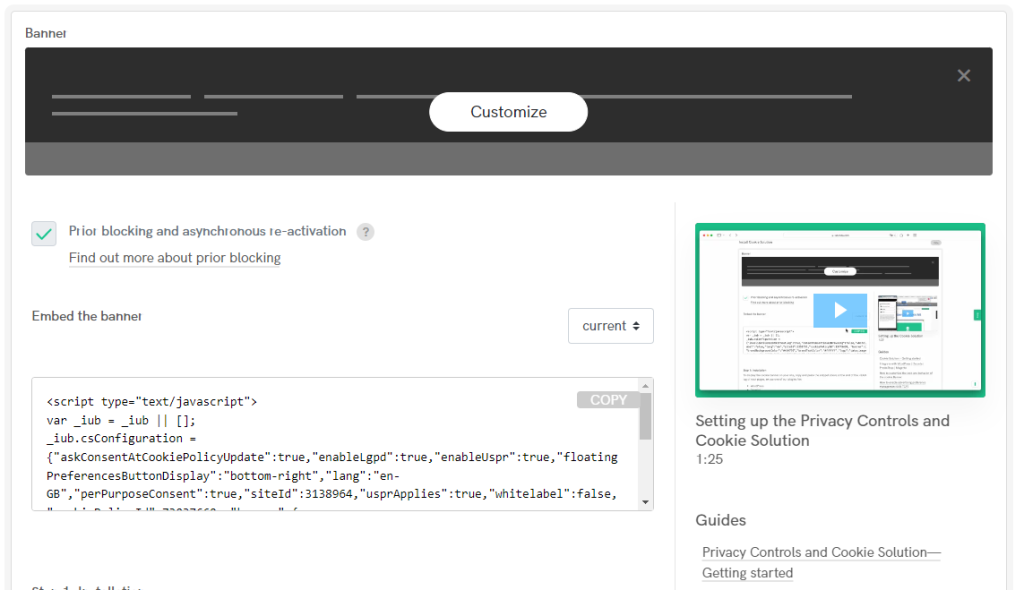
- Locate Privacy Controls and Cookie Solution again and click Embed to find the code for your website
- Copy the code by clicking the gray button saying COPY
Customize the code for Google Tag Manager
You need to add a few lines to the code you copied to ensure that your tags only fire when the visitor gives consent.
Paste the copied code into a text editor of your choice (e.g. Notepad, Word, or Google Docs). The code should look something like this:
<script type="text/javascript">
	var _iub = _iub || [];
	_iub.csConfiguration = {
	"askConsentAtCookiePolicyUpdate":true,
	"enableLgpd":true,
	"enableUspr":true,
	"floatingPreferencesButtonDisplay":"bottom-right","lang":"en-GB","perPurposeConsent":true,
	"siteId":3138964,
	"usprApplies":true,
	"whitelabel":false,
	"cookiePolicyId":73037660,
	"banner":{
		"acceptButtonDisplay":true,
		"backgroundOverlay":true,
		"closeButtonDisplay":false,
		"customizeButtonDisplay":true,
		"explicitWithdrawal":true,
		"listPurposes":true,
		"rejectButtonDisplay":true,
		"showPurposesToggles":true
			}
	};
</script>
<script type="text/javascript" src="//cdn.iubenda.com/cs/gpp/stub.js"></script>
<script type="text/javascript" src="//cdn.iubenda.com/cs/iubenda_cs.js" charset="UTF-8" async></script>
Now, copy the code below, including the initial ” , “
,
        "callback": {
            onPreferenceExpressedOrNotNeeded: function(preference) {
                dataLayer.push({
                    iubenda_ccpa_opted_out: _iub.cs.api.isCcpaOptedOut()
                });
                if (!preference) {
                    dataLayer.push({
                        event: "iubenda_preference_not_needed"
                    });
                } else {
                    if (preference.consent === true) {
                        dataLayer.push({
                            event: "iubenda_consent_given"
                        });
                    } else if (preference.consent === false) {
                        dataLayer.push({
                            event: "iubenda_consent_rejected"
                        });
                    } else if (preference.purposes) {
                        for (var purposeId in preference.purposes) {
                            if (preference.purposes[purposeId]) {
                                dataLayer.push({
                                    event: "iubenda_consent_given_purpose_" + purposeId
                                });
                            }
                        }
                    }
                }
            }
        }
Paste the copied code into your original code, at the point we have shown in the screenshot below:
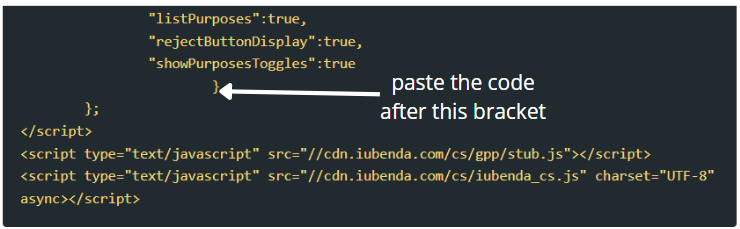
You should now have a full set of code that looks like the following:
<script type="text/javascript">
	var _iub = _iub || [];
	_iub.csConfiguration = {
		"askConsentAtCookiePolicyUpdate":true,
	"enableLgpd":true,
	"enableUspr":true,
	"floatingPreferencesButtonDisplay":"bottom-right","lang":"en-GB","perPurposeConsent":true,
	"siteId":3138964,
	"usprApplies":true,
	"whitelabel":false,
	"cookiePolicyId":73037660,
	"banner":{
		"acceptButtonDisplay":true,
		"backgroundOverlay":true,
		"closeButtonDisplay":false,
		"customizeButtonDisplay":true,
		"explicitWithdrawal":true,
		"listPurposes":true,
		"rejectButtonDisplay":true,
		"showPurposesToggles":true
			},
        "callback": {
            onPreferenceExpressedOrNotNeeded: function(preference) {
                dataLayer.push({
                    iubenda_ccpa_opted_out: _iub.cs.api.isCcpaOptedOut()
                });
                if (!preference) {
                    dataLayer.push({
                        event: "iubenda_preference_not_needed"
                    });
                } else {
                    if (preference.consent === true) {
                        dataLayer.push({
                            event: "iubenda_consent_given"
                        });
                    } else if (preference.consent === false) {
                        dataLayer.push({
                            event: "iubenda_consent_rejected"
                        });
                    } else if (preference.purposes) {
                        for (var purposeId in preference.purposes) {
                            if (preference.purposes[purposeId]) {
                                dataLayer.push({
                                    event: "iubenda_consent_given_purpose_" + purposeId
                                });
                            }
                        }
                    }
                }
            }
        }
	};
</script>
<script type="text/javascript" src="//cdn.iubenda.com/cs/gpp/stub.js"></script>
<script type="text/javascript" src="//cdn.iubenda.com/cs/iubenda_cs.js" charset="UTF-8" async></script>
Add the code to your website
Once your code is ready, paste it into your website just before the closing </body> tag.
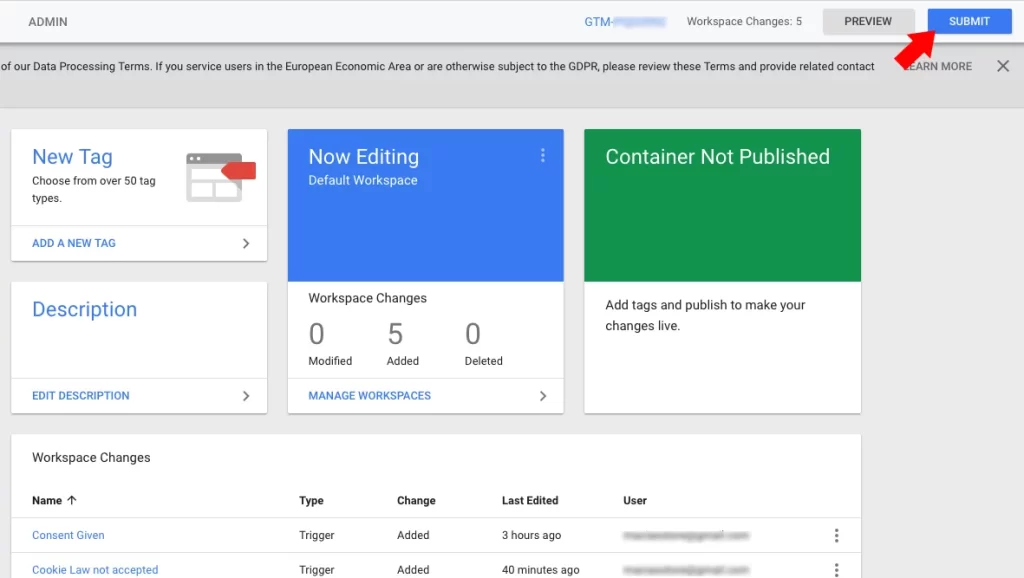
Publish in Google Tag Manager
When everything is set up, publish your tags and triggers in Google Tag Manager to make them active on your website.
Test that everything works
Make sure that:
- The cookie banner is displayed correctly
- No non-essential cookies are set before consent
- GTM tags only fire after consent is given
Summary
You have now connected Cookie & GDPR Manager with Google Tag Manager using prior blocking.
This means:
- Cookies are properly blocked before consent
- Your tags respect the user’s choices
- Your website complies with data protection requirements
Next Steps
Add more tags in Google Tag Manager as needed and connect them to the correct triggers. Don’t forget to publish your changes each time you update your configuration.

