
If a security breach on your website has infected the database itself, you can use a virus scanner following the instructions below.
Note! We recommend you take the following steps carefully, as this can cause site malfunctions.
Coinhive database attack:
First, create a current backup of the database by downloading it to your computer: in the database list, click the three dots on the right and select Download.
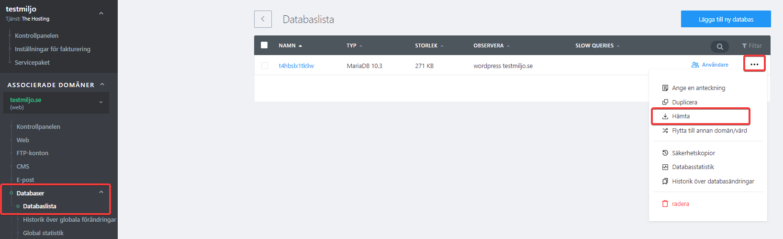
Then log in to the shell console associated with your hosting, for example following these instructions:
https://kunskap.websupport.se/kb/webbkonsol-shell/
Run this command to download the database to the shell:
mysqldump -u username -p password -h host -P port database > infected_dump.sql
Replace username, password, host, and port with your actual database login credentials, which you can find in your credentials section.
Next, run a script on the database dump (a database backup) that will clean the database of CoinHive infection:
perl -pe 's#[\s\S]*?(CoinHive|authedmine)[\s\S]*?##g' < infected_dump.sql > clean_dump.sql
You can then upload the database back to the server with this command:
mysql -u username -p password -h host -P port database < clean_dump.sql
Then check that your site is working properly, which it hopefully will be.
As a final step, we recommend you remove unnecessary files to save space with this command:
rm infected_dump.sql clean_dump.sql

