Instructions for beginners
You can easily manage your email accounts with us. Add new addresses, edit existing ones, set up auto-replies/aliases/forwarding, and more. You do all this through your control panel using the instructions below.
1. Log in to Control Panel »
2. In the “Overview” box, click the “Email accounts” tab and then the email address you want to manage.
3. You’ll then access the administration for that specific address.
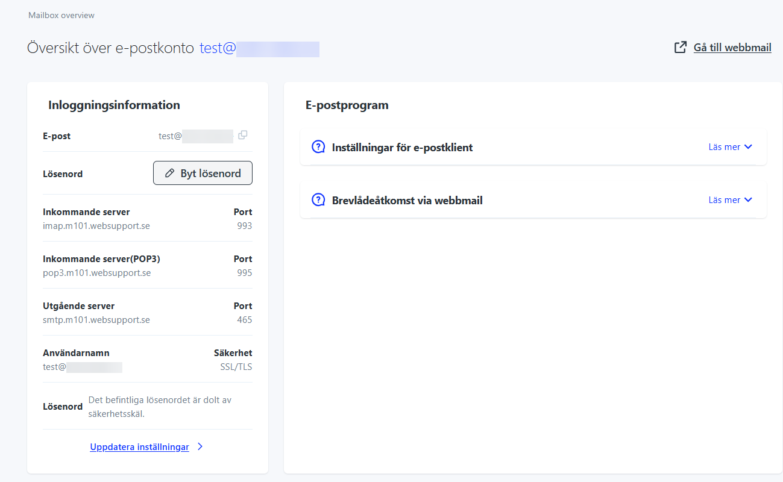
Here you’ll find all login credentials for a specific email address. The page is divided into 2 sections.
Login information – Contains your server details and port numbers needed to add your address to your phone, tablet, or email program.
Access to our web-based email client – Which you can reach via webmail.websupport.se, or alternatively webmail.yourdomain.tld.
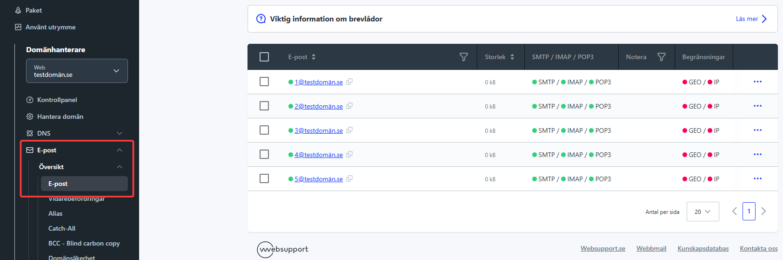
If you want to manage your entire email domain or get a clear overview of your different email addresses instead, click Email → Overview → Email in the left menu.
Create an email address
Creating an email address is super simple and is easiest done directly from your control panel homepage. Click “Add new service” in the “Overview” box and select “Add an email address”.
Settings
Email address – Enter the name for the email address.
Password – The password you want to assign to the address. Note that the password must be at least 8 characters long. You won’t be able to see your password in plain text later, so you’ll need to reset or change it if needed.
Comment: Space where you can mark the address to make it easier to identify in your administration.
Advanced settings (Optional)
Here you can set which protocols you want the address to use. We recommend using the default settings.
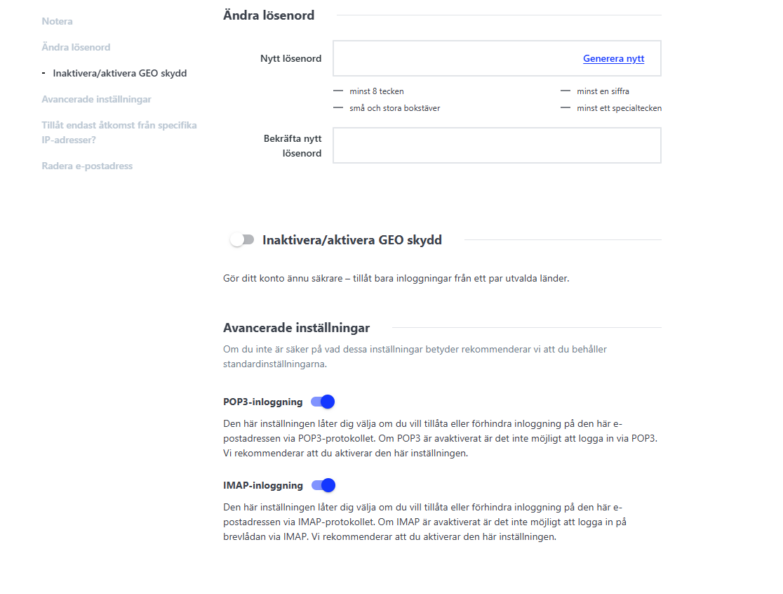
POP3 login – Enable/Disable POP3.
IMAP login – Enable/Disable IMAP
IP protection – Set access to the email address to only be allowed from a specific IP address.
GEO protection – List of countries from which it’s possible to access the email address.
If you’re unsure, leave these settings at their default values.