
Under Domain security you manage two protection mechanisms for incoming email: RBL blacklisting and SPF checking. Here we show what they do and how to enable or disable them.
- Log in to admin.websupport.se.
- Click the domain name you want to manage.
- Go to Email → Overview → Domain security.
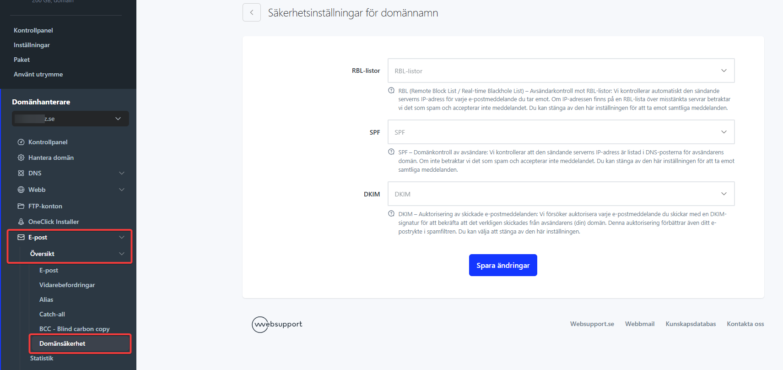
RBL – sender blacklisting
RBL checking compares the sender server against a blocklist. If the server is on the list, the email is marked as SPAM.
If legitimate email is blocked, there are two solutions:
- The administrator of the blacklisted server contacts the blocklist provider to be removed.
- You disable RBL checking – you then get all email, including spam. Use with caution.
SPF – sender domain verification
SPF is a DNS record that specifies which servers can send email from a domain. If SPF checking is enabled and the sender server is not authorized, the sender gets the error: 550 Message rejected because SPF check failed.
Solutions:
- The sender adds the correct SPF record to their domain.
- You disable SPF checking – this can lead to increased spam in the mailboxes under the domain.

