
Instructions for beginners
An MX record (mail exchanger record) specifies which server handles email for your domain. You typically set multiple MX records (though not separate email services) for a domain, and email is routed by priority. MX values are always given as a domain name (mailin1.mindoman.se).
EDIT MX RECORDS
- Log in to Control Panel »
- Click your domain in your services list
- In the DNS menu on the left, select DNS then DNS settings and click the MX tab
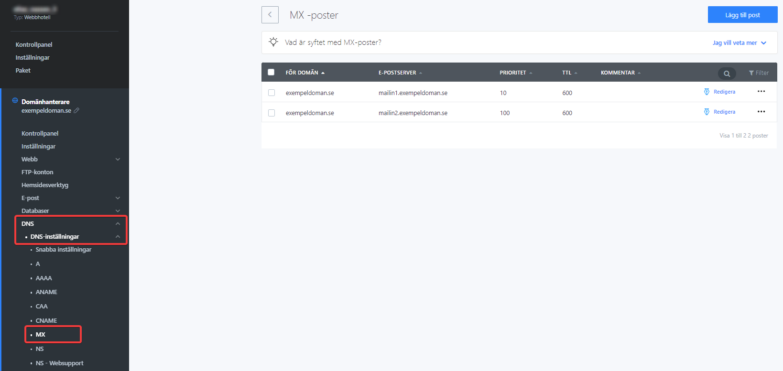
When you open this section, you see a table with your existing MX records. You can create a new record, edit, or delete an existing one.
        <div class="hts-messages hts-messages--alert  hts-messages--withtitle hts-messages--withicon "   >
            <span class="hts-messages__title">MX record changes can take up to 2 hours to take effect.</span>
        </div><!-- /.ht-shortcodes-messages -->
MX record editing form
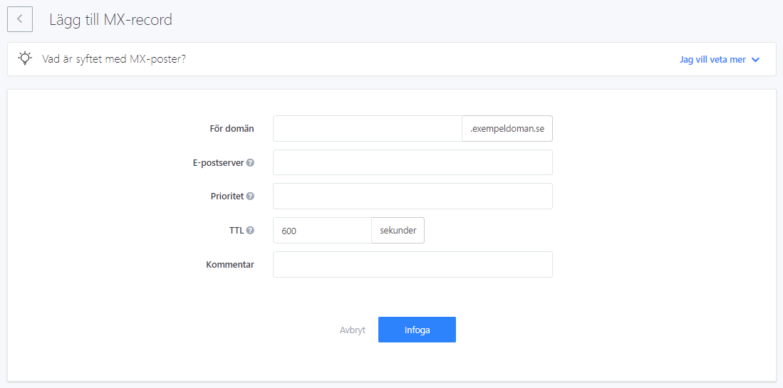
- Leave the first field empty for it to apply to @
- Mail server – The server address that handles email for your domain. Enter it as a domain name, not an IP address
- Priority – When multiple MX records are listed for a domain, the one with the lower priority number is used first. If it doesn’t respond, the next server is tried
- TTL value – Determines how long ISP servers remember the DNS settings. Time is specified in seconds.
- Comment – You can enter anything or leave it blank. Only you see this in your control panel.
- After you’ve filled in the form, click Save changes
Delete an MX record
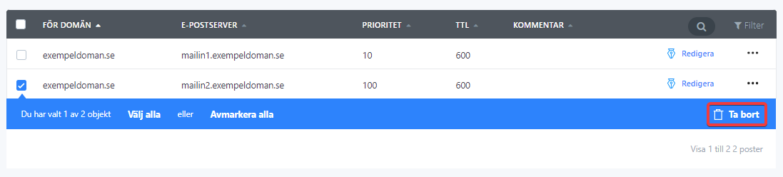
Click the checkbox in the table on the left to select one or more MX records, then click Delete. If you accidentally delete a record, you can restore it in the Change history section. Find the change in the list and click Restore. All your DNS settings return to their previous state.
Examples
MX routing to Google
You’ve set up MX records for the domain example.se pointing to Google Mail. This means all email sent to name@example.se goes to Google’s email server, which processes it further. The record looks like this:
@  600  IN  MX   1    ASPMX.L.GOOGLE.COM.
@  600  IN  MX   5    ALT1.ASPMX.L.GOOGLE.COM.
@  600  IN  MX   5    ALT2.ASPMX.L.GOOGLE.COM.
@  600  IN  MX   10    ALT3.ASPMX.L.GOOGLE.COM.
@  600  IN  MX   10    ALT4.ASPMX.L.GOOGLE.COM.

