Guide for experienced users
Cron is a program that runs on our servers which you can configure to run tasks at specific times. Use it to update databases, perform regular backups, download information from the internet, and more.
CRON jobs are very useful for automating repetitive tasks. For example, you can run a script once a week to delete temporary files and free up space. Some programs, like Drupal, require CRON tasks to work properly. Cron runs your script at a specific time. You can set up multiple types of crons on our servers. Configure Cron through our WebAdmin interface.
Installation
- Log in to https://admin.websupport.se
- Select the domain for which you want to set up Cron in the Services section
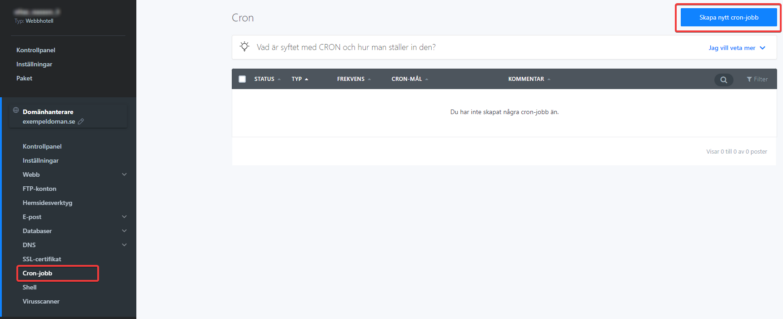
- In the left menu, click CRON Jobs, then click the blue Create a New CRON Task button in the top right
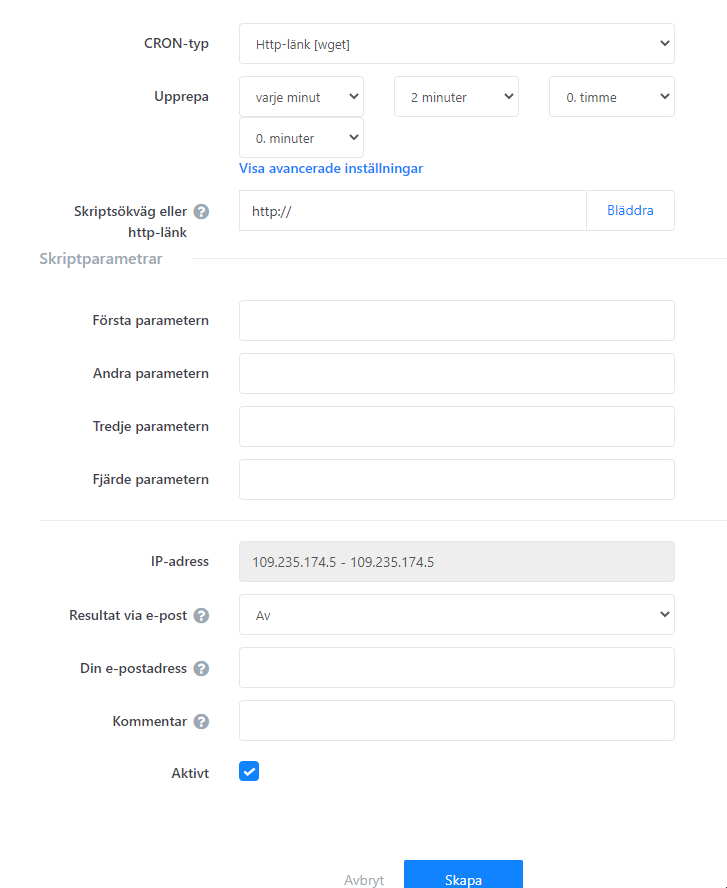
Description of CRON parameters (WGET)
1. Cron Type
You can run CRON jobs either as a PHP script on your server or as any web address.
- For HTTP, enter something like https://domain.se/scripts/cron.php?variable=value
- For a PHP script, enter the relative path from the domain (web/scripts/cron.php). See the guide section below for more details
2. Repeat
Cron uses specific syntax to set when it runs. It uses standard Unix crontab format [minutes] [hours] [day of month] [month] [day of week]. Use this page to easily set your desired time: https://www.openjs.com/scripts/jslibrary/demos/crontab.php
Time examples in advanced settings
Every minute
* * * * *

Every 5 minutes
*/5 * * * *

Every hour at minute 30
30 * * * *

Every day at midnight
0 0 * * *

Sunday at 12:00
0 12 * * 0 or
0 12 * * 7

Weekdays at 12:00 except weekends
0 12 * * 1,2,3,4,5
Allowed time values
- Minutes: 0-59
- Hours: 0-23
- Day of month: 1-31
- Month: 1-12
- Day of week: 0-7 (0 and 7 are Sunday)
3. Script path or HTTP link
Enter the URL you want CRON to request regularly. Enter it in a format like https://domain.se/scripts/cron.php?key=value
4. Send result by email?
You can be notified by email when the cron runs. Select the option to send output to email. Alternatively, send email only if the cron produces output.
5. Comment
For your own reference, such as better tracking of CRON tasks. Only shows in this admin interface.
6. Active task
This checkbox enables or disables the CRON task.
Description of CRON parameters (PHP)
The repeat settings and allowed values are the same. Unlike WGET cron, you also specify script parameters. You can set a maximum of four parameters.
Example URL: https://www.domain.tld/index.php?option=com_unpaidreminder&tmpl=component&s=XxNBsQrfSr