For experienced users
The WebAdmin interface offers several advanced FTP settings you can configure for greater security or attack protection. These include Geo and IP protection.
Geo Protection
Geo protection allows FTP login only from defined countries or IP addresses. By default, connections are allowed from Sweden. If you travel abroad, we recommend checking whether the country is whitelisted before you go, otherwise FTP connections won’t work. You can edit the whitelist anytime through WebAdmin, even from abroad.
- Log in to Control Panel»
- In the Services section, find your domain and click it, then go to Advanced Configuration > FTP Accounts on the left
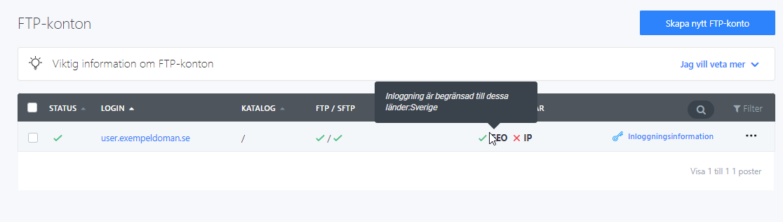
- In this section, you can see the status of GEO protection for each FTP account by hovering your mouse over GEO to see the current allowed countries.
- To change the allowed countries, click Login Information and then Change Settings
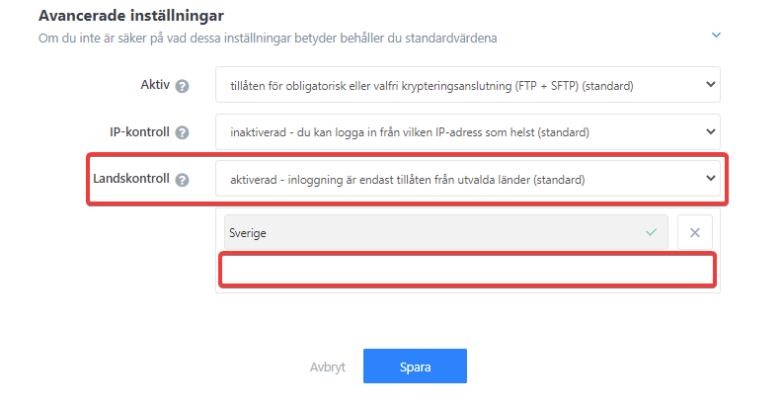
- See Advanced Settings for GEO protection settings
- Click the country field to add permission, and a checkmark next to a country name blocks access
- When you’re done editing, make sure to click Save.
IP Protection
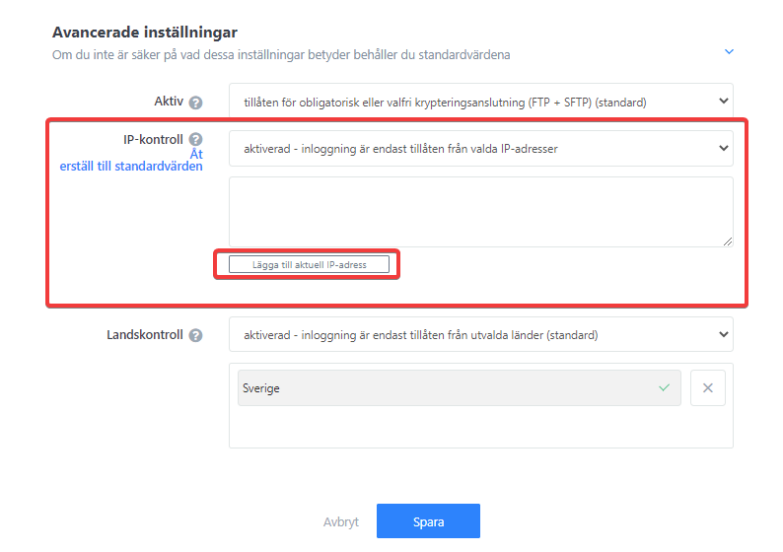
When you enable this feature, the system checks the IP address from which the connection request comes when accessing this FTP account. If the IP address isn’t on the list, access is denied. This is useful if you want to limit FTP access to a specific device or devices with a static IP address. The system also lets you set your current IP address.
FTP / SFTP Login Enabled
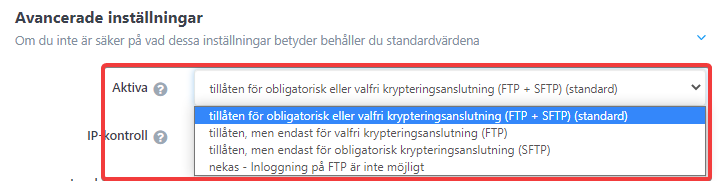
You can completely disable FTP login for each account, or you can force encrypted connections only via SSH or FTP.