Instructions for beginners
You can easily transfer your website from your previous provider using our built-in migration tool in your control panel.
Start migration
- Log in to Control Panel»
- In your service overview, click the domain you want to migrate data for.
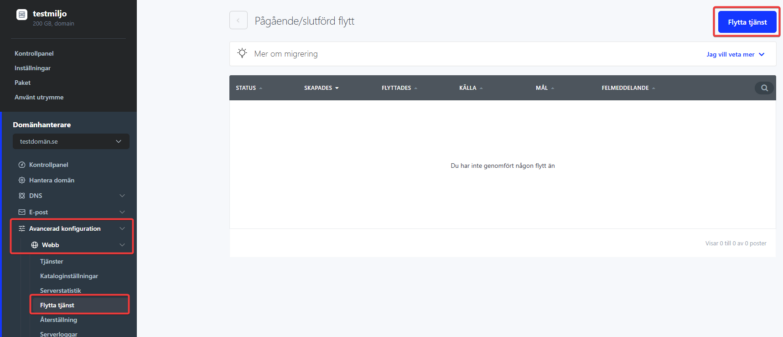
- In the left menu, click Advanced Configuration, Web and then Move Service.
- Here you see a list of previous migrations/imports that have been done. To perform a new one, click Move Service in the top right corner.
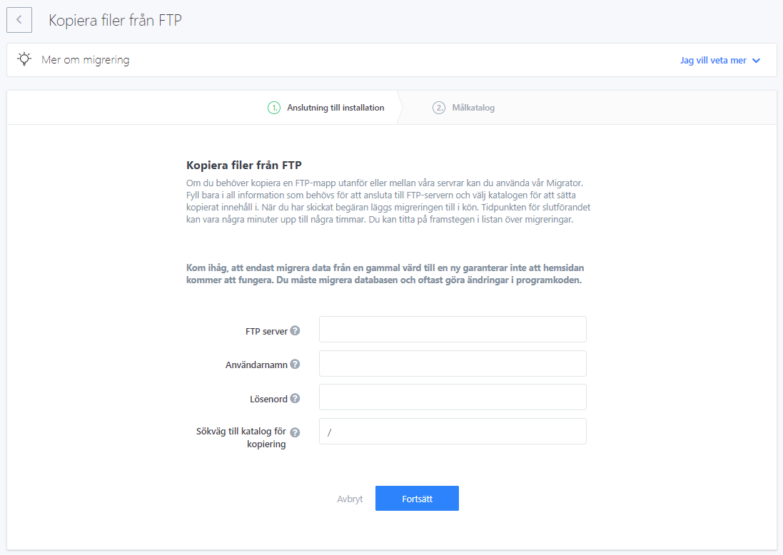
To start the migration, you first need to fill in your FTP connection details with us, and choose where you want the migrated data to go on your server with us.
- Address of the original server, the server you want to move from.
- Login name for the original server, the server you want to move from.
- Password for the above user on the original server.
- Path to the directory where you want the data to be moved.
- Click Continue to start moving your files.